Communicate effectively by making notations on stills, graphics, and documents, adding new information as your meeting or lesson progresses using the supplied Interactive Light Pen or optional Interactive Pointer. Companion LightPen3 Software*1 for Windows® or Mac improves writing smoothness for up to two presenters at once*2 with support for high frame-rates. You can save modified images to PC for later distribution
Automatic Calibration
Auto calibration gets you started faster. If preferred, you can also set up manually just by touching four screen corners with the pen/pointer.
Better Performance
A faster refresh-rate lets you write with the smoothness of a real marker.
Supports Two Pens*3
Dual Pen Mode (half- or full-screen modes) lets two presenters write at the same time.
Half Screen Mode
The screen is divided vertically with individual color and line-width selection available on both panes.
Full-Screen Mode
Color and line-width for both pens is the same across the whole screen.
Two Interactive Light Pens Included
Lightly touch the included pens across the projection surface to write.
Whiteboard Software Extends Built-in Functions
Need more functions? Interactive capabilities expand with Whiteboard Software for Windows PC*4. This software works with interactive-ready Panasonic projectors and Touch Screen LCD displays*5 to greatly enhance your communication capabilities

*1 Download free LightPen3 Software for Windows here or for Mac OS here. Please check the device, OS version, and driver requirements (if needed) before download and installation to your device.
*2 Additional pens/pointers are optionally available to support multiple presenters.
*3 Available for Windows operating systems.
*4 Download free Whiteboard Software for Windows 8.1 and Windows 10 here.
*5 Please note that some functions available to professional displays are not supported on projectors.
High-Contrast Visibility in Bright Rooms
Give your presentation team an edge with bright and vivid 3,300 lm* images behind them. Thanks to 20,000:1 contrast, graphics, text, and video are clear and sharp while color resists washout in natural or artificial light.
* Brightness is 3,300 lm for the PT-TW381R/TW380, 3,200 lm for the PT-TX350, and 3,800 lm for the PT-TX440.
Short-Throw Design Gives a Clearer View
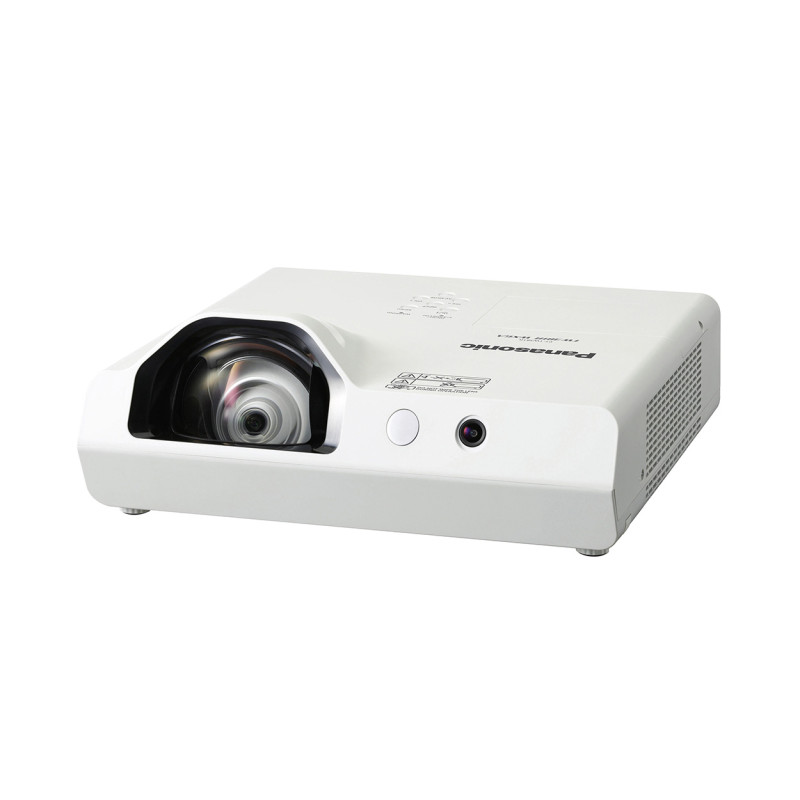
Communicate with flair almost anywhere with support for desktop or ceiling installation. The PT-TW381R Series can be set up at arm’s length from the screen to reproduce a big 80-inch image*. As well as bringing large pictures to small spaces, the short-throw lens casts the image in front of the presenter so his or her shadow does not obscure the screen.
* Projection distance is 80 cm for the PT-TW381R/PT-TW380 and 75 cm for the PT-TX440/PT-TX350 when projecting an 80-inch image.

Daylight View Lite
Daylight View Lite optimizes color and brightness according to ambient lighting levels. This function is easily accessed using the supplied remote control.

Extensively Connected with HDMI® and PC Inputs
The PT-TW381R Series can connect up to four players at a time via dual HDMI and D-sub inputs*, so multiple presenters won’t have to share a cable, making transitions smoother.
* Computer In 2 is shared with Computer Out.
Options for Wireless Media Mirroring and Casting*1
Create a collaborative space with our optional USB wireless modules for mobile*2 and PC*3 screen-mirroring, or power a media streaming module*4 via USB DC terminal for media casting from PC or mobiles without cable clutter.

*1 Optional ET-WML100 (stock limited)/AJ-WM50 series wireless module is subject to regional availability and requires Wireless Projector app for iOS or Android™ or Presenter Light (for Windows® PC) to enable wireless projection. ET-WML100 Series and AJ-WM50 Series devices are both compatible with all projectors in this series, and either can be used to enable the wireless network function.
*2 When using the Wireless Projector app, display resolution differs depending on your iOS/Android device and the display device. The maximum supported display resolution is WXGA (1280 x 800).
*3 When using Presenter Light Software, images are projected with 1280 x 800 dots or 1024 x 768 dots onto the screen. Also, your PC display resolution may be forcibly changed, and audio playback disrupted or become noisy, while images and sound are being transmitted.
*4 Panasonic cannot guarantee compatibility with third-party media streaming devices.
Image Adjustment for Distortion-free Projection
V/H Keystone Correction (H: ±15 ° auto/manual, V: ±15 ° manual) provides some leeway for image geometry adjustment when projecting off-axis to the screen center, while Curved Screen Correction tames distortion when shooting onto convex or concave surfaces.

Light and Compact for Easy Portability
Intended for easy room-to-room portability or as an on-ceiling solution supporting Panasonic software and third-party control protocols over LAN, the PT-TW381R Series’ light 3.9 kg (8.6 lbs) weight makes handling a breeze. Manual controls let presenters set up quickly and easily on-site and commence their workshop almost immediately with less wasted time.
Selectable Modes Suit Your Projection Priorities
Choose your preferred mix of high brightness, extended maintenance, or quiet operation. Normal Mode prioritizes picture quality in bright environments, while Quiet Mode projects at a virtually inaudible 30 dB*1 with an extended filter replacement cycle. Eco Mode strikes a useful balance between the two with 20,000-hour*2 lamp-life and 35 dB*1 operation.
*1 38 dB in NORMAL Mode.
*2 Lamp life is approximately 20,000 hours in Eco Mode and approximately 10,000 hours in Normal/Quiet Mode. Replacement timing varies depending on operating environment and usage conditions.




 Organic Gifts
 Organic Roasted Coffee
 Hand Picked Teas